



Scoped browser access
The current extension manifest targets Tinder pages, Tinder-hosted media, VibeMatch, mapping resources, and model assets needed by the product.
Your AI search assistant for Tinder
Find more of the profiles that feel like your type.
Tell VibeMatch what matters, from age, distance, and activity to smile, style, and overall vibe. Your assistant checks each profile and shows how well it fits your search.
Chrome Web Store listing is being prepared
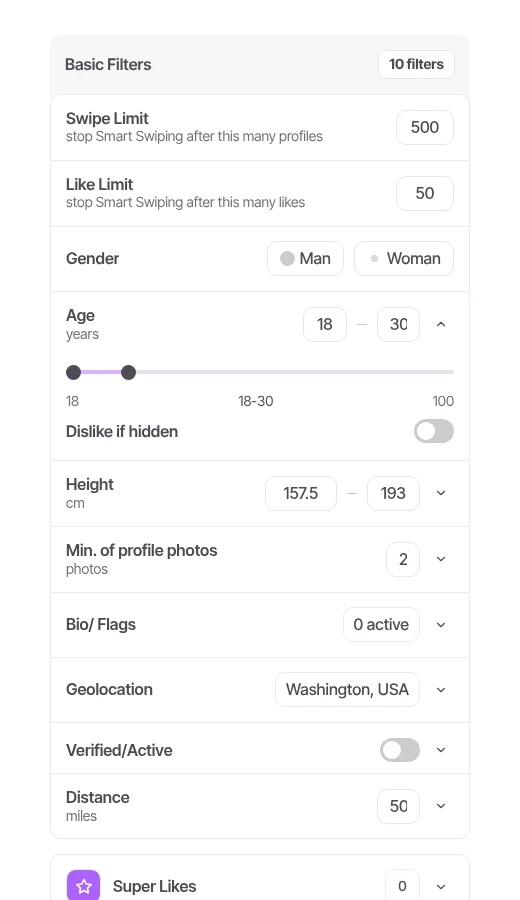
Live UI preview. Profile and values are illustrative.
Combine profile facts with the visual cues that matter to you.
Follow each check and understand why a profile fits your search.
Adjust your criteria, pause the search, or stop whenever you want.
From install to a smarter search
Start with straightforward profile facts, then make the search more personal with visual AI criteria. You choose every signal that matters.
Install the desktop Chrome extension, then open Tinder in the same browser.
Choose essentials such as age and distance, then add AI criteria for appearance, style, and vibe.
VibeMatch checks profiles against your criteria and shows why each one fits or falls outside them.
AI and profile data can be incomplete or misread. VibeMatch explains its checks so you can refine the search and keep your own judgment in the loop.
A search shaped around you
Basic criteria handle reliable profile facts. Pro AI criteria help recognize the visual details that are harder to put into a standard dating-app filter.
Control and privacy
VibeMatch is designed for Tinder profile pages. The extension uses only the information needed for your selected filters and the account features you use.
The current extension manifest targets Tinder pages, Tinder-hosted media, VibeMatch, mapping resources, and model assets needed by the product.
Selected Pro AI filters can send profile photos to VibeMatch's configured AI processing provider. Basic checks do not silently become Pro checks.
This website ships without ad pixels, behavioral analytics, or a signup form. Contact starts in your email client.
Free and Pro
Paid checkout is not available yet. Exact Pro pricing, billing interval, and currency will be shown before any purchase can be made.
Free
Free
Free features do not require a paid subscription.
Pro
Price announced before checkout
No payment or reservation is collected on this website.
Trial and plan terms shown at checkout will control when billing launches. SeeRefund & cancellation and Terms.
The Free experience continues with Basic filters and a daily usage limit. You do not have to buy Pro to keep using the Free features.
No. You describe what matters to you, and VibeMatch compares available profile information with those criteria. You can see why a profile fits, adjust the search, and review the results. AI can be wrong, so your judgment always comes first.
Depending on your selected filters, VibeMatch can evaluate profile text, age, distance, activity signals, photo count, and profile photos that Tinder makes available in the browser. Some checks run locally; selected Pro AI checks can use remote processing. See the Privacy Policy for detail.
Yes. The active analysis screen includes Pause and Stop controls, and you can change criteria or set session limits before starting again.
No. VibeMatch is a search assistant, not a compatibility score or a promise of dating outcomes. It cannot guarantee matches, replies, dates, or account availability.
No. VibeMatch is an independent browser extension and is not affiliated with, endorsed by, or sponsored by Tinder or Match Group. Tinder can change its website or policies, which may affect extension behavior.
The Chrome Web Store listing and Stripe checkout are not public yet. We will show the exact price, billing interval, and currency before accepting any payment. Until then, the CTA opens an honest launch-status page.
Less noise. A search that feels like yours.
Chrome Web Store listing is being prepared.